Budget
The Budget tab of the workspace defines the financial rules inherited by every project: currency, cut-off date, budget versions, information displayed in budget tables and default resource rates.
Settings → Workspace → Budget
It is made of four sub-tabs: General, Presentation, Resource rates and Profile rates.
Unless stated otherwise, changes are only kept once the workspace has been saved.
General tab
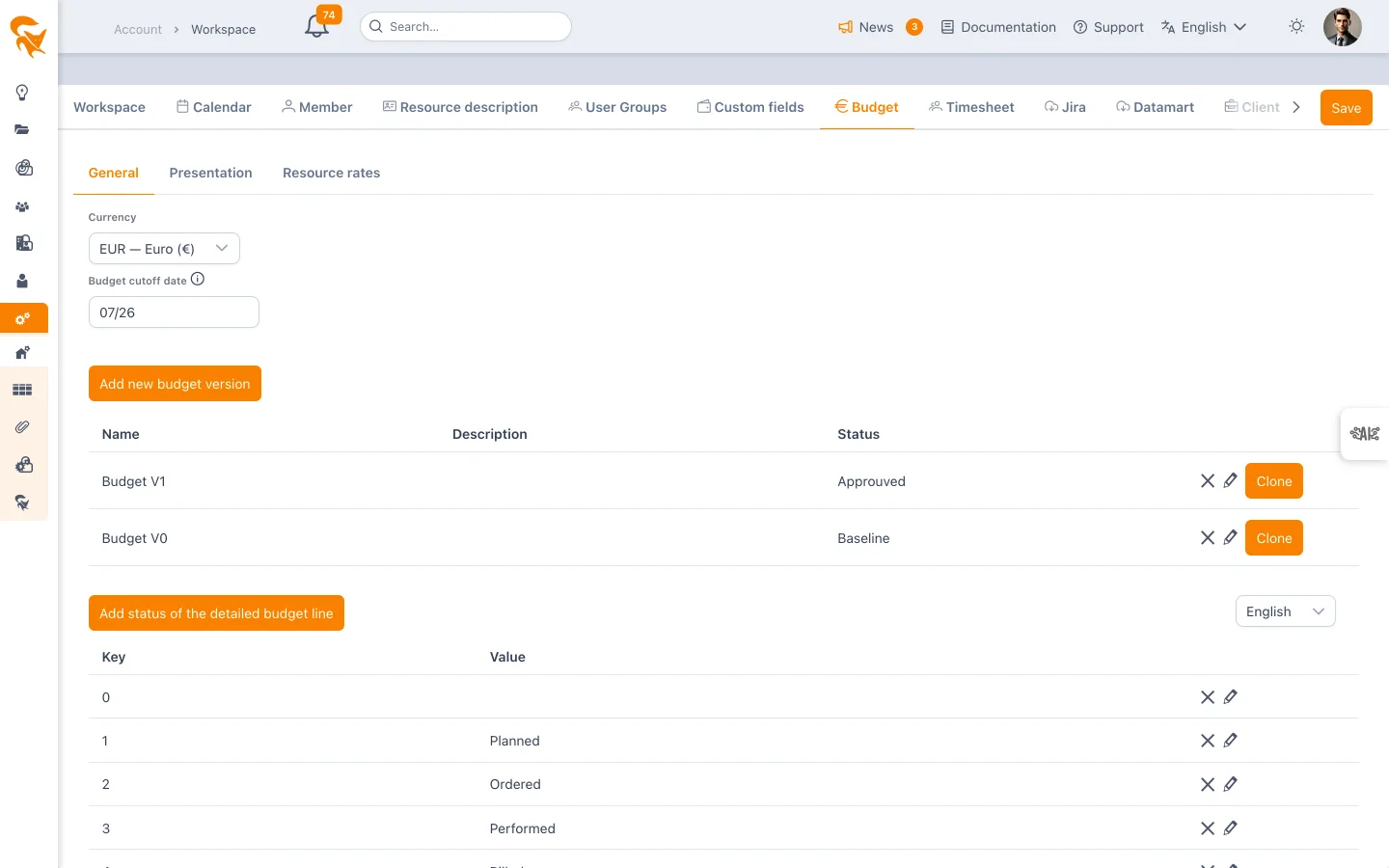
Currency
Choose the workspace currency (EUR, USD, GBP, XOF…). It applies to every budget valuation: envelopes, costs, revenues and margins.
The field lists all currencies with a filter by code or by label.
Budget cut-off date
The budget cut-off date (month/year) marks the end of the last closed month. It does not block data entry: it drives the reading of budget tables, where cells are highlighted according to their position relative to that cut-off.
| Row | On or before the cut-off date | After the cut-off date |
|---|---|---|
| Planned | normal display | flagged in orange (planned over a closed period) |
| Actual | greyed out (closed period) | normal display |
| Forecast | greyed out | flagged in orange |
Moving this date forward at each month end makes it possible to tell consolidated past from still-forecast future at a glance.
Budget versions
Budget versions let you keep several states of the same budget: baseline validated in a steering committee, approved version, work-in-progress version, archives.
The Add a budget version button creates a new version for every project of the workspace. Each row of the table holds:
- Name — label displayed in budget views
- Description — free-form detail
- Status — In progress, Baseline, Approved or Archive
A budget version can only be created on an already saved workspace. On a workspace that has not been saved yet, the application displays an error asking you to save it first.
Cloning a version
The Clone to button offers two modes:
- New — creates a new version from the source version, without further confirmation.
- An existing version — overwrites the target version with the content of the source version. Because this operation is destructive, a confirmation dialog asks for your e-mail address and the exact name of the source version. The clone only runs if both values match.
Deleting a version
Deleting an already saved version follows the same safeguard: your e-mail address and the exact name of the version to delete. A version that has been added but not yet saved is simply removed from the table.
Detailed budget line statuses
These statuses make up the list of values offered on the detailed budget lines of projects (and on tasks and tickets attached to a budget). They are free-form: committed, ordered, invoiced, to be validated… depending on your procurement process.
Each status is made of:
- a key — stable technical identifier, stored on budget lines
- a value — displayed label, editable in each language of the workspace
The language selector above the table sets which language the label is edited in. Switch languages to complete every translation; the key itself stays the same.
Budget lines reference a status through its key. Renaming an existing key loses the status on every line using it — change the label instead.
Presentation tab
This tab controls which budget information is visible in the budget views of projects, portfolios and the synthesis. It aligns the tool with your budget maturity: steering on costs alone does not require revenue or margin columns.
Three families are available:
| Family | Content |
|---|---|
| Cost | expenses (internal charges, purchases, subcontracting…) |
| Revenue | amounts invoiced to the client |
| Margin | Revenue − Cost gap, computed from the two above |
For each family, four kinds of amount can be enabled independently:
- Budget — initial approved envelope
- Forecast — latest estimate at completion
- Planned — amounts derived from planning (allocations, valuation of workload)
- Actual — amounts effectively recorded
The checkbox in front of the family name acts as a master switch: ticking it enables all four kinds, unticking it disables them all. Conversely, enabling a single kind automatically re-enables the family.
Some kinds may be mandatory depending on your workspace configuration: their checkbox is then greyed out and cannot be unticked.
Resource rates tab
This tab defines the default daily rates of every resource of the workspace. They value allocations and workload in budgets automatically when no rate is set on the budget envelope — a rate entered at budget level always takes precedence.
Two rates are managed per resource:
- Billable cost rate — cost of the resource, feeding cost lines
- Billable revenue rate — amount invoiced to the client, feeding revenue lines
One set of rates per actual type
By default, only the Standard actual type is active and the grid shows only these two columns. If other actual types are active (for instance Not standard), the grid shows one cost / revenue pair per type, with the type name appended to the column header ("Cost rate — Not standard").
The Not Billable type also has its cost / revenue pair. Without a value, its cost takes the Standard cost; its revenue, however, is zero: it never takes the Standard revenue.
Which rate applies? Each time entry is valued according to its own actual type; planned work, which has none, takes the envelope's type. For a resource:
- if the envelope defines a rate for that type (its usual rate for its default type, otherwise a rate by type row), that rate applies;
- otherwise FoxPlan takes, from this tab, the rate of that type;
- otherwise the envelope's usual rate, then the Standard rate of this tab;
- for Not Billable time, revenue has no fallback: without a revenue entered for that type, it is zero.
Rates entered on envelopes and the Standard rates of this tab are kept as they are. As long as no rate by type is defined (neither here nor on the envelope), valuations are unchanged.
The grid
The grid lists all workspace members (members, administrators, portfolio managers and readers, contributors) with their organisational attributes: Last name, First name, Company, Department, Team, Position, Profile, then the two rate columns.
Every column offers sorting and filtering (numeric filter on rate columns), which makes it easy to isolate a population — for instance every resource of a department, or every resource whose rate is still zero.
Editing rates
- Select one or several rows using the checkboxes (the header checkbox selects every filtered row).
- Click Edit rates (selection).
- Enter the billable cost rate and the billable revenue rate (up to 4 decimals) — one pair per active actual type, except Not Billable.
- Confirm: the values are applied to the whole selection.
Edited rates are only persisted once the workspace has been saved. Leaving the page without saving discards the entries.
Clicking the avatar at the start of a row opens the full resource profile without leaving the tab: handy to fix a department or a company before filtering on that value.
Profile rates tab
This tab sets daily rates per resource profile (the profile chosen on the resource's record). It is a fallback: a resource with no rate of its own is valued at its profile rate.
The grid lists every profile of the catalogue — Category, Profile, number of Resources holding it — then the same rate columns as the Resource rates tab (one cost / revenue pair per active actuals type). A deactivated profile no longer appears, unless it still carries a rate.
To change rates, select one or more rows then Edit rates (selection). A field left empty removes the profile rate (its resources then follow the usual rules); a 0 forces a zero rate.
Which rate applies? The level comes first, then the resource over the profile:
- the resource rate on the envelope;
- the profile rate on the envelope (Profiles cost);
- the resource rate in the workspace (Resource rates tab);
- the profile rate in the workspace (this tab).
As soon as a resource has a rate at a given level, its profile rate at that same level is ignored. The per-actuals-type rules described above apply to profile rates in the same way.
As for resources, profile rates are only kept once the workspace is saved.
See also
- Budget management — using the budget at project level
- Portfolio budget — multi-project consolidation
- Timesheet — time entry feeding actuals
- Calendar — work capacity used as a basis for valuations