Datamart
The Datamart tab drives the generation of the company's analytical datamart: a denormalised dataset, meant to be consumed by your BI tools.
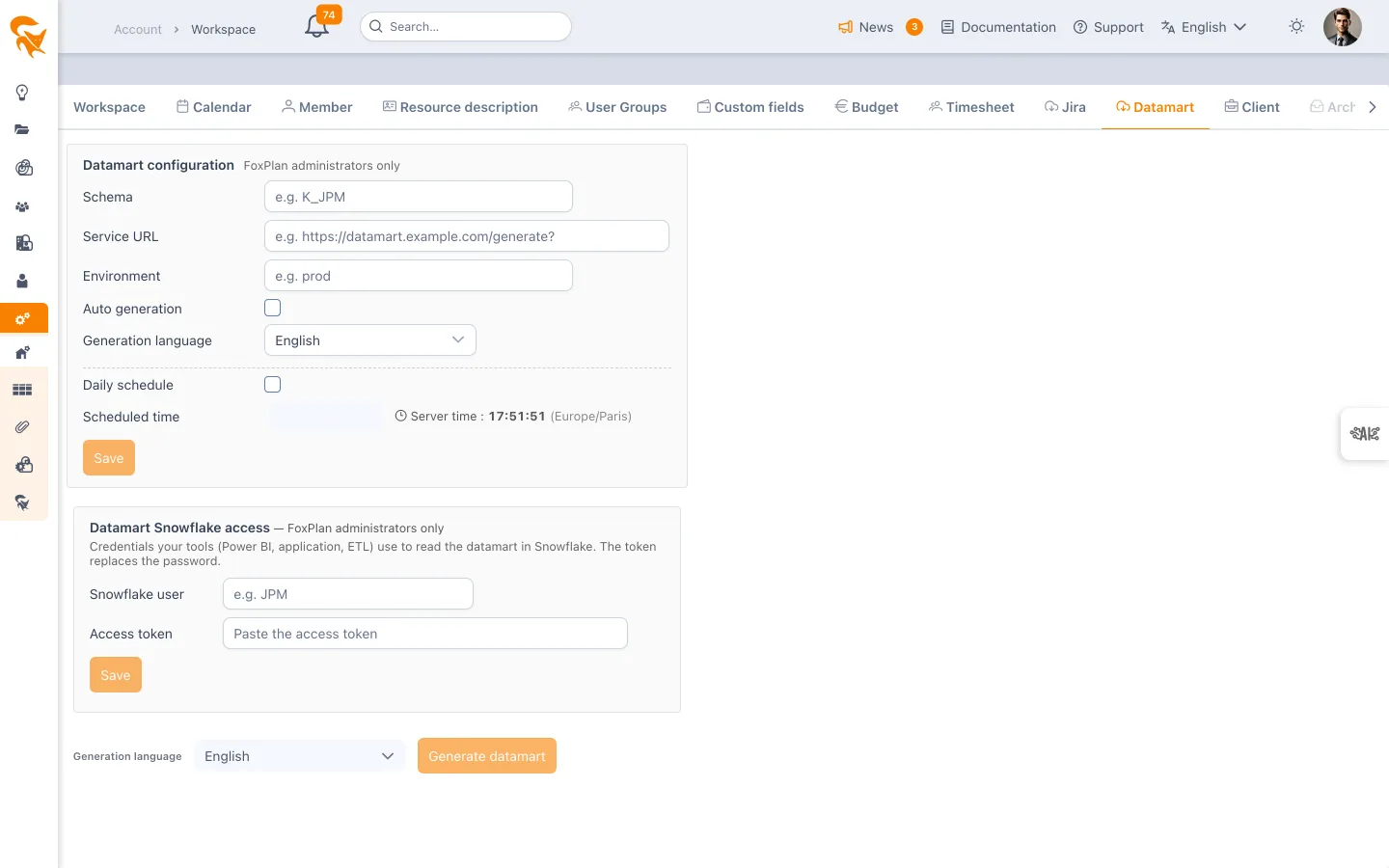
Settings → Workspace → Datamart
The tab is not available on a demo licence: it then shows the invitation to move to the Pro version.
Two blocks, two audiences
The screen stacks a configuration and a command, and the two do not address the same people.
Datamart configuration
This block carries the note "FoxPlan administrators only" — it does not appear for a regular workspace administrator. It defines where and how the generation runs:
| Field | Purpose |
|---|---|
| Schema | The target schema name used during generation (e.g. K_JPM) |
| Service URL | The address of the generation service called (e.g. https://datamart.example.com/generate?) |
| Environment | The environment name passed to the service (e.g. prod) |
| Generation language | The language of the datamart labels and of the API responses |
| Automatic generation | Enables scheduled generation for this company |
Each of these fields overrides the global server configuration for this company: that is the mechanism letting several customers share one instance with different targets.
Daily schedule
| Field | Purpose |
|---|---|
| Daily schedule | Triggers the generation once a day |
| Scheduled time | The HH:mm:ss time of the trigger |
| Run days | The days on which the generation runs. By default, every day except Friday and Saturday |
| Server time | A reminder of the time zone in which the above is interpreted — shown next to it, read-only |
| Last scheduled run | Timestamp of the last automatic pass |
FoxPlan runs with several replicas. A Redis lock guarantees only one of them triggers the daily generation: there is never a double run, however many nodes there are.
If the schedule is enabled with no time set, the screen shows a warning — the generation would never fire.
Run days
Nobody usually works on weekends: the data does not change between Friday evening and Sunday. By default, the generation therefore runs neither on Friday nor on Saturday. Sunday stays checked so that Monday morning starts from up-to-date data.
Days are read in the server time zone, at the moment of the trigger. With a scheduled time after midnight (for example 02:00:00), the night from Friday to Saturday falls on Saturday: that is the day to uncheck.
If scheduling is enabled with no day checked, the screen refuses to save.
Generating on demand
The Generate button starts an immediate generation, without waiting for the daily slot.
- While it runs, FoxPlan answers: "The datamart is being generated, try again in 15 minutes."
- If the configuration is incomplete, the button is disabled and a tooltip states that the schema, the URL and the environment must be filled in by a FoxPlan administrator.
Snowflake access
For customers who have subscribed to the datamart service, the data in Snowflake is accessed with the access token available in FoxPlan: Settings → Workspace → Datamart, Datamart Snowflake access block.
- Click Show token, then Copy.
- In your tool (Power BI, application, ETL), enter the Snowflake user shown in the block and paste the token instead of the password.
The token is set and renewed by FoxPlan. It is visible to workspace and environment administrators, and every display is recorded.
See also
- API usage guide — the other route to the data, for application integrations
- Workspace — the overview of configuration tabs
Schedule the generation outside data-entry hours: the datamart photographs the data at trigger time, and a nightly run gives a stable dataset for the morning reports.