The AI assistant: everything it can do
The FoxPlan AI assistant is an agent: it understands a request in natural language, reads or changes your data through predefined business actions, then answers with the result. This page tours what it can do. Configuration (engine, permissions, internal knowledge) is described in FoxPlan agentic AI.
Where to find it and how it works
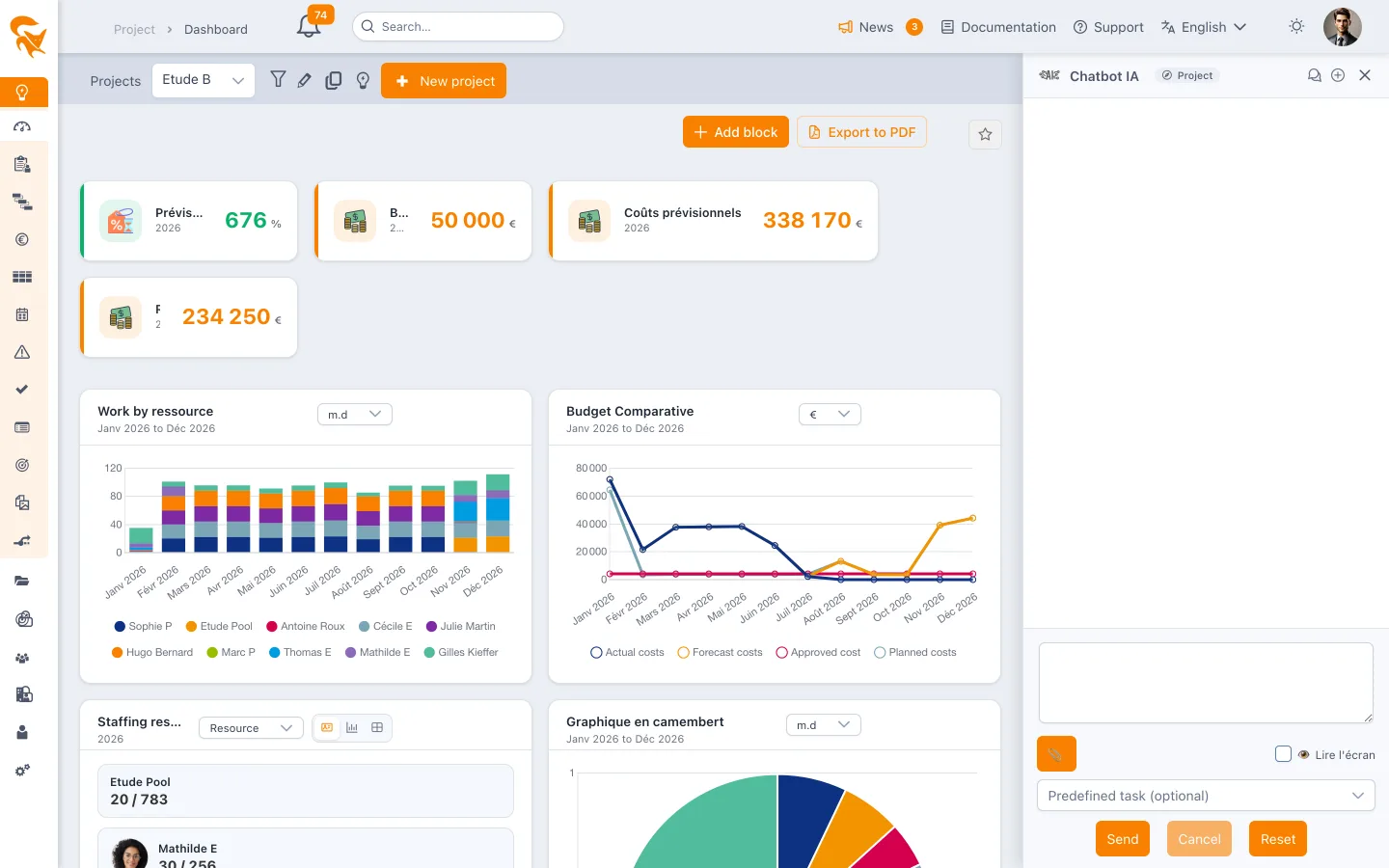
- The dock on the right. A tab anchored to the right edge opens the chatbot; drag its edge to resize it. It is available on every screen once you are logged in, if your company has enabled the AI.
- It follows the current screen. A badge in the header shows the current context: Project, Project portfolio, Resource portfolio, Me or Workspace. Unless you say otherwise, the assistant reasons within that scope (see below).
- It can read the screen. The Attach screen checkbox sends the visible text with your question, handy for "explain this table" or "what is wrong here?".
- It reads your attachments. Drop a Word, Excel, PowerPoint, PDF or text file: the assistant extracts its content, without storing it, and can for instance create the tasks it finds there.
- It plays predefined tasks. The dropdown lists the tasks shipped with the product and those written by your company; a predefined task runs without typing anything.
- It exports. Ask for a Word, Excel, PowerPoint or PDF: the file appears under the answer, with real editable tables and charts.
- It remembers, per context. The conversation of a project, a portfolio or your personal screens resumes where you left it, for 24 hours, and each context has its own thread.
- It answers as a stream. Text arrives as it is produced, and a status line shows the tool being executed ("Tool queryProjects…"). Cancel interrupts the answer.
- It keeps your threads. The "Conversations" icon lists your recent threads (one per project, portfolio or Me screen); opening one replays its conversation and pins its context until the next navigation. "New thread" starts over on the current context.
- Its predefined tasks fit the screen. Only the tasks meant for the current screen are offered, and some ask for one or two parameters before running (period, person, team…).
- It can work on its own, on schedule. From Settings → AI assistant → My routines, a predefined task can be played every day, week or month on the scope of your choice, with your rights, delivered in the bell and/or by email.
The context follows the screen
| Screen you ask from | What the assistant talks about by default |
|---|---|
| A project (planning, kanban, risks, budget…) | That project: its tasks, registers, budget, members. "Project" predefined tasks apply directly. |
| A project portfolio | The projects of the portfolio, at once. A predefined task written for "the current project" (weekly status, risk review…) is played project by project and summarised. |
| A resource portfolio | The portfolio's team: workload, actuals, availability, absences. |
| Me (my job, my timesheet, my activity, my cards) | You: your tasks, your projects, your time, your notifications and saved views. |
| Workspace (settings, clients…) | No implicit scope: the assistant asks which one, or queries every project you can see. |
You can always name another project, portfolio or person explicitly: the request wins over the screen context.
Everything it can do
Each capability is a bounded business action, executed within the scope of your rights: the assistant sees and changes only what you could see and change yourself. Names in brackets are the action names, useful to read the request history or to connect an MCP client.
Read a project
| You can ask | What it does |
|---|---|
| "Where does the project stand?", "what are its dates, its priority?" | Project characteristics (getProjectInfo), members and roles (listProjectMembers). |
| "List the tasks", "the lowest-level tasks" | Numbered task tree (listProjectTasks), leaves only (listLeafProjectTasks), allocations of a task (listTaskAllocations). |
| "What are the risks, decisions, actions, changes, requirements?" | Each register of the project (listProjectRisks, listProjectDecisions, listProjectActions, listProjectChanges, listProjectRequirements). |
| "Show the latest status reports", "the project documents" | Status reports (listProjectReports), documents (listProjectFiles). |
| "Where does the budget stand?", "how much of it is CAPEX?" | Budget synthesis of the dashboard: budgeted, consumed, forecast, revenues, margin, each line carrying the envelope it belongs to and its accounting nature, OPEX or CAPEX (getProjectBudget). |
| "Give me the project sheet", "everything to know about this project, without the documents" | The whole sheet in one call — definition, team, tasks, cards, registers, status reports, documents, budget, baselines — any section can be excluded (getProjectSnapshot). Every list value (status, state, risk rates, weather, custom lists) comes with its label in your language, and the budget with a per-envelope summary (budgeted, planned, forecast, actual). |
| "What does the specification say about deadlines?" | Reads the content of a project document reachable by its link, converted to text (readProjectDocument). A link that requires a login cannot be read: attach the file to the chat instead. |
| "Which columns does the kanban have?", "who commented on this risk?" | Kanban columns (listKanbanColumns), comment thread of an object (listObjectComments). |
| "Who changed this task and when?", "which baselines exist?" | Change history with before/after values (getObjectHistory), planning baselines (listProjectBaselines). |
Query several projects at once
Bulk queries answer in one call what used to require opening each project. They accept a portfolio, a list of projects or the whole workspace, plus structured filters (status, project leader, owner, resource, dates, custom field…). The answer always states the total number of results and whether the list was truncated.
| You can ask | What it does |
|---|---|
| "Marie's projects", "active priority-1 projects ending this quarter" | Filtered projects (queryProjects). |
| "The late tasks of portfolio X", "what is Paul assigned to in October?", "milestones before June" | Filtered tasks and cards across projects (queryTasks). |
| "The open risks of the portfolio", "actions assigned to Paul", "this month's status reports" | One register across several projects (queryProjectObjects). |
| "The consumed budget of every project of the portfolio", "the OPEX and CAPEX budget of the workspace" | Budget synthesis project by project, with totals and their split by accounting nature — OPEX, CAPEX, and untyped envelopes kept apart (queryProjectBudgets). |
| "What did the team consume last month?", "the portfolio's actuals per project" | Planned and actual man-days per resource and task over a period, summarised by project and by resource (queryAllocations). |
| "Who is available the first week of July, in the study team, with a business analyst profile?" | Capacity minus load across all projects, filtered by team, profile, department or position (queryResourceAvailability). |
| "What was discussed this week on the portfolio?" | Comments of every task and register (queryComments). |
| "Which projects have no baseline?", "which projects is Marie on?", "which projects have no project leader?" | Baselines (queryBaselines) and members (queryProjectMembers) of several projects. |
| "Which portfolios contain this project?", "contracts ending this quarter" | Filtered portfolios (queryPortfolios), clients (queryClients) and contracts (queryClientContracts). |
Portfolios, strategic plan, clients, workspace
| You can ask | What it does |
|---|---|
| "Which portfolios can I see?", "the projects of the Industry portfolio" | Project portfolios, resource portfolios and strategic plans (listPortfolios), projects and members of a portfolio (getPortfolioProjects). |
| "Who is overloaded in November?" | Workload plan of a resource portfolio: load against capacity per day, week or month, projects carrying the load (getResourceWorkload). |
| "How are our strategic objectives doing?" | Objective tree, weights, project contributions, achievement (getStrategicPlan). |
| "Our clients", "the contracts of client Durand" | Clients and contracts of the Clients module (listClients, listClientContracts). |
| "Who is absent next week?", "which resources exist?" | Resource absences (getResourceUnavailability), workspace resources with team, profile, capacity (listEnvironmentResources). |
| "Find the 'Redesign' project", "which workspace are you on?" | Global search (searchFoxplan), current workspace and user (getCurrentEnvironment), configured fields and lists, possible values included for system lists as well as custom ones (describeEnvironmentFields). |
Build and change the planning
| You can ask | What it does |
|---|---|
| "Create a task Scoping from 3 to 14 March", "generate the task tree of a website redesign" | Create a task (createProjectTask) or a whole tree from a WBS (createProjectTasksFromWbs). |
| "Shift every task by two months", "set 2.3 to 5 days" | Change dates, duration, work, status, attributes (updateProjectTask), deadline (setTaskDeadline). |
| "Chain the tasks", "3.1 depends on 2.4" | Dependency links (createTaskDependency), sequential chaining of leaves (createLeafTaskDependencies). |
| "Copy the tasks of project A into project B" | Copy tasks with their allocations, without actuals (copyTasksToProject). |
| "Delete task 4.2", "undo", "redo" | Deletion (deleteProjectTask), undo and redo of the last planning operation (undoLastPlanningChange, redoLastPlanningChange). |
| "Move the card to in progress", "close ticket 12" | Move a card to another Kanban column (updateTaskKanbanColumn). |
| "Shift every task of lot 2 by two weeks", "set all of Paul's tasks to Done" | Bulk change of several tasks of one project, in two steps: the assistant first shows each task with its before/after values, then applies after your agreement; each task stays undoable (updateProjectTasksInBulk). |
Assign resources
| You can ask | What it does |
|---|---|
| "Assign Marie at 50% on 2.3 on the Studies envelope" | Assign a resource to a task, attached to a budget envelope (assignResourceToTask). |
| "Remove Paul from this task" | Delete an allocation (deleteTaskAllocation). |
Manage projects
| You can ask | What it does |
|---|---|
| "Create a project CRM Migration, kanban, priority 1" | Create a project with standard and custom attributes (createProject). |
| "Change the project end date", "set the project state to Done" | Update project attributes (updateProject). |
| "Add Sophie as a contributor" | Add a member with a role (addProjectMember) — only people already present in the workspace. |
| "Take a Kick-off baseline", "archive the project" | Planning baseline (createProjectBaseline), archive or restore (setProjectArchived, administrator only, with confirmation). |
| "Start the HR Portal idea with the Rollout template, beginning March 1" | Converts an idea into a project, with or without a gantt template (listProjectTemplates, convertIdeaToProject): the assistant first shows what the template will add (fields completed, tasks, columns, budgets) and only converts after your agreement. The template completes the idea without overwriting anything; the start date positions its first task. updateProject refuses to move an idea out of the "Idea" state. |
| "Add projects A and B to the Industry portfolio", "remove Paul from the Studies team" | Composition of a project or resource portfolio, for its manager only; a dynamic portfolio is refused (updatePortfolioProjects, updatePortfolioResources). |
| "Create the objective Reduce delays, weight 30, OPEX", "the project contributes 60% to objective X and 40% to Y" | Objectives of a strategic plan and a project's contributions, with the screen's rules: mandatory nature, shares summing to 100 per nature (updateStrategicObjective, setProjectStrategicContributions). |
Keep the project registers
| You can ask | What it does |
|---|---|
| "Record a supplier delay risk, high probability", "note the decision to postpone lot 2" | Create a risk, decision, action, change or requirement (createProjectObject), with your workspace's custom lists and fields. |
| "Close action 3", "set the risk to high impact" | Update an existing object (updateProjectObject). |
| "Close all of Paul's overdue actions", "set every supplier risk to high impact" | Bulk change of several risks, decisions, actions, changes or requirements of one project, with preview then confirmation (updateProjectObjectsInBulk). |
| "Write this week's status report" | Dated status report, one indicator (sun, cloud, storm) and a comment per axis, built from the project data (createProjectStatusReport, updateProjectStatusReport). |
| "Create a Studies CAPEX envelope from March to June", "put €12,000 of forecast on the Acceptance line in June" | Budget envelopes and lines of a project: creation, update, amounts over a period in currency or days (createBudgetEnvelope, updateBudgetEnvelope, addBudgetEntry, setBudgetEntryAmount). |
Cards, comments, timesheet, personal space
| You can ask | What it does |
|---|---|
| "Create me a card to prepare the committee", "open a ticket on the project" | Personal card (createPersonalCard) or project card, private or public (createProjectCard). |
| "Comment the task: validated with the client", "comment this risk" | Comment on a task (addTaskComment) or on a risk, decision, action, document, envelope (addObjectComment). |
| "I spent 2h on the spec yesterday", "I am on leave on Friday" | Actuals entry in days (addTimesheetActual) and absence declaration (addResourceVacancy), for you or a resource you manage. |
| "What did I miss?", "mark everything as read", "my saved views" | In-app notifications (listMyNotifications, updateNotificationsRead), favorites and shared views (listMyFavorites). |
Documents, help and internal knowledge
| You can ask | What it does |
|---|---|
| "Export this status as PowerPoint", "give me the risks in Excel" | Generate a Word, Excel, PowerPoint or PDF document, with metrics, tables and charts, each optional section by section (exportDocument). |
| "How do I create a baseline?", "what is prioritisation for?" | Search and read the FoxPlan documentation (searchDocumentation, getDocumentationPage, listDocumentationPages). |
| "What is our rule for critical risks?", "what does our methodology say?" | Your company's business context and knowledge base (getCompanyContext, searchCompanyKnowledge, listCompanyKnowledgeDocuments, getCompanyKnowledgeDocument). |
Predefined tasks shipped with the product
A predefined task is a ready-to-play scenario: the assistant chains the right actions and presents the result in an agreed form. Your company can add its own in AI configuration → Predefined tasks.
| Predefined task | What it produces | Where to play it |
|---|---|---|
| Weekly status | Progress, delays, risks and actions of the project, summarised. | Project, or project portfolio (project by project) |
| Committee preparation | Agenda for the next meeting: follow-up of the previous meeting's actions, decisions taken and expected, project items. | Project |
| Meeting minutes | From your notes or a file: minutes saved on the meeting, attendees, proposed actions and decisions (created only if you approve). | Project |
| Committee action follow-up | Actions decided in committee: late, open, done, by meeting and by owner, with suggested reminders. | Project |
| Committee decisions | Register of decisions by meeting, with those left without a follow-up action. | Project |
| Risk review | Analysed risk register, criticalities, action plans to complete. | Project or portfolio |
| Late tasks | Late or at-risk tasks, by owner, rescheduling proposals. | Project or portfolio |
| Workload check | Load rate per resource and week, overloads and underloads, possible trade-offs. | Resource portfolio |
| Budget point | Budgeted, consumed, remaining and drift. | Project or portfolio |
| Portfolio review | Project table: status, dates, leader, delays, open risks, budget; points of attention and decisions. | Project portfolio |
| My projects | The projects you lead, with their alerts and the date of their last status report. | Me |
| Pending actions of a person | Every open action of a person across all projects, with overdue dates and a reminder message. | Anywhere |
| Milestones of the quarter | Milestones of the period per project, past unfinished milestones, milestones of the next two weeks. | Anywhere |
| Missing status reports | Active projects with no recent status report, with their leader, ready to chase. | Portfolio or workspace |
| Recent decisions | Decisions of a period, grouped by project, with those that need follow-up. | Portfolio or workspace |
| Actuals of a project portfolio | Planned, actual, variance and completion rate per project and resource, most consuming rows. | Project portfolio |
| Actuals of a resource portfolio | Time consumed by each team resource, split by project, resources with no entries. | Resource portfolio |
| Find an available resource | Who is free over a period, given the load across all projects, filtered by team or profile, absences checked. | Project, project or resource portfolio |
| Project sheet | Complete project sheet in one read, sections can be excluded, with an offer to export as Word or PowerPoint. | Project |
Examples by role
Project leader, from the project
- "Write this week's status report from the tasks and risks."
- "Create the tasks of lot 2 from the attached document, then chain them."
- "Who is free the week of the 6th to take over acceptance testing?"
PMO, from a project portfolio
- "Portfolio review" (predefined task), then "export it as PowerPoint".
- "Which projects have had no status report for a month? Draft the reminder."
- "The consumed budget per project, with the margin."
Team manager, from a resource portfolio
- "What did the team consume in September, per project?"
- "Who is overloaded in November and on which projects?"
- "Who has a business analyst profile and is available three days in July?"
Contributor, from Me
- "What did I miss this week?"
- "Enter 0.5 day on the Tests task yesterday and a leave on Friday."
- "My late actions, across all projects."
Good to know
- Your rights, always. Every action is checked as if you had done it in the corresponding screen: register by register, project by project, portfolio included. A risk reader does not get the decisions they cannot open.
- Company permissions. The administrator can close categories of actions (task creation, timesheet, export…) to the chatbot or to external MCP clients. A closed action answers "operation not allowed".
- Writes are explicit. The assistant states what it creates or changes, asks for confirmation on sensitive actions (archiving, mass assignments) and can undo the last planning operation.
- Volumes are bounded. Bulk queries return at most a few hundred rows and say so when there are more: tighten the filters rather than asking for "everything".
- The same assistant elsewhere. The same actions are exposed to an external MCP client (Claude, for example) through FoxPlan's MCP server; only the screen context and the predefined tasks are specific to the built-in chatbot. See FoxPlan agentic AI.
See also
- My instructions to the AI assistant — tell the assistant who you are and how to answer you
- FoxPlan agentic AI — engine configuration, company context, knowledge base, permissions, history
- API usage guide — for programmatic integrations